

Designs in Markdown
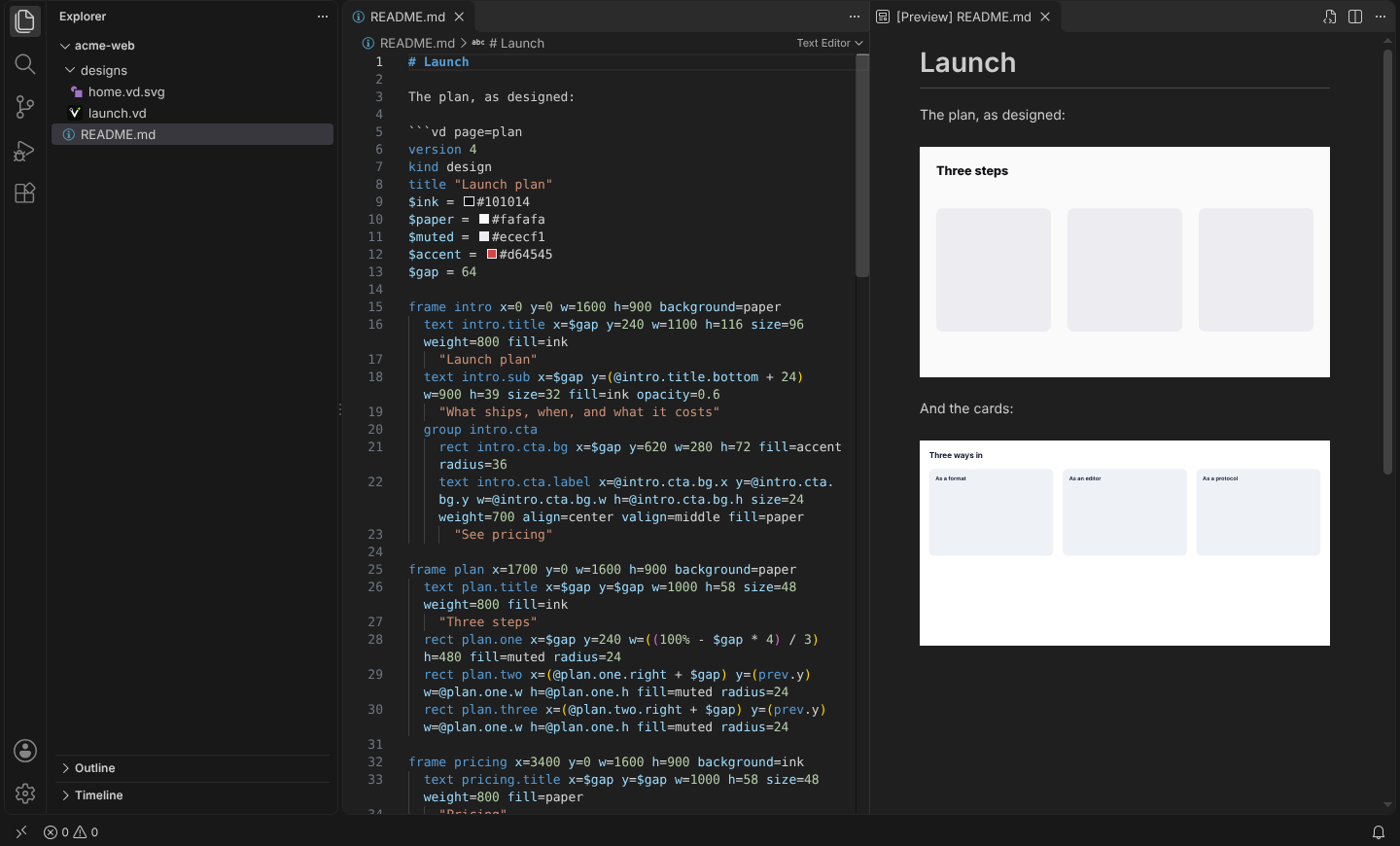
A ```vd fence holds a vDesign document. With these plugins it is drawn as
the design rather than shown as its source, wherever the Markdown is turned
into a page.
Source
version 4
kind design
title "Pricing card"
frame card w=480 h=200 background=#ffffff
  rect card.bg x=0 y=0 w=100% h=100% fill=#f4f4f6 radius=16
  text card.name x=32 y=32 w=300 h=29 size=24 weight=700 fill=#101014
    "Pro"
  text card.price x=32 y=80 w=400 h=58 size=48 weight=800 fill=#d64545
    "$49 a month"
That figure is a fence, drawn when the page was built. Open Source under
it to see the fence: it asks for that with the source option.
Options
After vd on the fence’s first line. The spelling is the same in every host,
so a fence written once works in a docs site, VS Code and Obsidian.
| Option | What it does |
|---|---|
page=pricing | Draw one page, by id or 0-based number. Default: the whole document. |
src=home.vd | Draw a .vd or .vd.svg file, relative to the Markdown file. |
mode=view | A live view in the browser: pages, zoom and Present. Default: a still drawing. |
height=480 | The live view’s height, in pixels. |
source | Also show the fence’s text, folded, under the drawing. |
alt="…" | The drawing’s accessible name. Default: the document’s title. |
Unknown options are ignored, so a fence written for a later version still draws.
A fence that cannot be drawn, for instance one with no page in it, stays the code block it would have been, with what was wrong listed under it.
A live view
With mode=view, the drawing is still made at build time, and a script then
turns it into a view the reader can page through and present. With no script,
or before it runs, the reader sees the drawing.
That is src= pointing at a three-page deck, drawn with mode=view height=380.
In a docs site
The plugins are entries of @getv.design/embed, version 0.2 and later. They import nothing
from the Markdown library they plug into, so they work with whichever version
a site has.
| Site built with | Use |
|---|---|
| VitePress, Slidev, Marp, markdown-it | @getv.design/embed/markdown-it |
| Astro, Next.js MDX, Docusaurus, Gatsby, Starlight | @getv.design/embed/rehype |
| marked | @getv.design/embed/marked |
markdown-it, for example in VitePress’s config.mts:
import { vdesignMarkdownIt, createRenderer } from '@getv.design/embed/markdown-it';

// Optional: lay text out from the font files, so lines break where the app breaks them.
const renderer = await createRenderer({ fonts: 'exact' });

export default {
  markdown: {
    config: (md) => md.use(vdesignMarkdownIt, { renderer }),
  },
};
rehype, for example in Astro’s astro.config.mjs:
import { rehypeVdesign } from '@getv.design/embed/rehype';

export default {
  markdown: { rehypePlugins: [rehypeVdesign] },
};
The rehype plugin lays text out exactly by default and reads src= files
relative to each Markdown file, never outside the folder the build runs in.
Link the styles on the pages that show designs, from your copy of the
package. fonts.css makes the drawings’ text Inter, from the fonts/ folder
beside it; leave it out if your site has Inter already:
<link rel="stylesheet" href="/vendor/vdesign/markdown.css" />
<link rel="stylesheet" href="/vendor/vdesign/fonts.css" />
For live views, run hydrate once the page has loaded, and link view.css
with the id the view looks for, so it injects no <style> of its own:
<link rel="stylesheet" id="vd-viewer-styles" href="/vendor/vdesign/view.css" />
<script type="module">
  import { hydrate } from '@getv.design/embed/auto';
  hydrate();
</script>
Untrusted Markdown
A fence in a wiki page or a README may be written by somebody else. The
drawing follows only https:, mailto: and in-design links, draws pictures
only from the document itself, fetches nothing, and runs nothing. A fence over
1 MB of text or 5,000 shapes stays a code block (limits changes both).
On GitHub
GitHub draws only the diagram languages it knows, and a ```vd fence shows
as text there. Two ways to show a design in a README:
- A
.vd.svg. Export with “Keep the design inside” in the app: an SVG that GitHub, npm and every browser show as a picture, and that vDesign and the VS Code extension open as the design. See .vd.svg. vd-renderin CI. It writes an.svgbeside each.vd, and--checkfails a pull request whose SVGs are out of date:
npx -p @getv.design/embed vd-render designs/
# .github/workflows/designs.yml
name: Designs
on: pull_request
jobs:
  rendered:
    runs-on: ubuntu-latest
    steps:
      - uses: actions/checkout@v4
      - uses: actions/setup-node@v4
        with:
          node-version: 22
      - run: npx -p @getv.design/embed vd-render designs/ --check
Then, in the README:

The SVG names the font and does not carry it, so a reader without Inter sees the same layout in another
sans-serif; a .vd.svg from the app carries its fonts.
In Obsidian
The vDesign plugin draws ```vd blocks in notes as live views, with the
same options. Its src= reads from the vault.
In VS Code
The VS Code extension draws fences in VS Code’s own Markdown preview, as still drawings.